Showing posts with label java. Show all posts

Sunday, April 26, 2020

SudokuFX: Migration to Java11 LTS

Better late than never: now I want to migrate SudokuFX to Java11.

Up to version 2020.1.1,  SudokuFX needs a Java Runtime with JavaFX integrated - version 8. Choosing the correct Java version is the first hurdle for the casual internet visitor, very easy to 'do wrong'. Cryptic errors will drive away newcomers, will cost even pro's some time until they realize that the wrong platform is used.

Java != Java

Choosing the wrong Java version is a common problem for beginners, I must admit that it becomes more and more complicated.

Every half year a new Java version is released, with new features, and several organisations provide builds. This is a good thing, the industry has to evolve the platform, and it is good if there exist different sources for Java binaries. Many years of development went into a build process which is now simple enough for the average Bob D. Eveloper to build OpenJDK themselves, which is - considering the details - a huge accomplishment. 

For the rest of us, the question is which version of Java to choose? Oracle is still the place to go if you have much money to buy their licenses and subscriptions. Alternatives can be used from AdoptOpenJDK, Azul and others. To ease the migration costs, LTS versions are maintained for a longer period of time - Java version 11 is the one the industry migrates to at this very moment. 

And even me with my SudokuFX project.

Still one has to keep in mind that everybody is advertising their latest release, as such often the newest runtimes and jdks are downloaded, and projects written for older incarnations of those technologies maybe just don't work. 

If your project has dependencies on libraries which are also only written for a specific version of the JDK the game becomes even more complex. Then, as a Scala User, you have even more troubles since libraries for a specific version of Scala doesn't really work together with a different Scala version ... 

I didn't even mention the modularization effort of the JDK itself, which - only very slowly but in a foundational manner - reinvents the whole ecosystem yet again. 

Don't get me wrong, everything happens because of a perfectly sound reason, but it is not trivial to get everything working, considering all those moving targets. There are also not many engineers around who can really cope with those topics to be honest.

Well. Enough motivation to do the move to Java11, without any JavaFX backed in the java runtime. 

SDK! Man!

To easily switch between Java versions (and jvm based applications like sbt, lein, scala and others) a tool called sdkman exists, which is very handy and lets you download and change used version of Java with a simple command. It's like a package manager, just for specific (java) applications. Highly recommended!

Here is an example of how it looks if you want to change a java version from current one to to the version AdoptOpenJDK provided, Java version 11:

homemac:sudokufx lad$ sdk list java
================================================================================
Available Java Versions
================================================================================
 Vendor        | Use | Version      | Dist    | Status     | Identifier
--------------------------------------------------------------------------------
 AdoptOpenJDK  |     | 14.0.1.j9    | adpt    |            | 14.0.1.j9-adpt      
               |     | 14.0.1.hs    | adpt    |            | 14.0.1.hs-adpt      
               |     | 14.0.0.j9    | adpt    | local only | 14.0.0.j9-adpt      
               |     | 13.0.2.j9    | adpt    |            | 13.0.2.j9-adpt      
               |     | 13.0.2.hs    | adpt    |            | 13.0.2.hs-adpt      
               |     | 13.0.1.hs    | adpt    | local only | 13.0.1.hs-adpt      
               |     | 12.0.2.j9    | adpt    |            | 12.0.2.j9-adpt      
               |     | 12.0.2.hs    | adpt    |            | 12.0.2.hs-adpt      
               |     | 11.0.7.j9    | adpt    |            | 11.0.7.j9-adpt      
               |     | 11.0.7.hs    | adpt    | installed  | 11.0.7.hs-adpt      
               |     | 8.0.252.j9   | adpt    |            | 8.0.252.j9-adpt     
               |     | 8.0.252.hs   | adpt    |            | 8.0.252.hs-adpt     
 Amazon        |     | 11.0.7       | amzn    |            | 11.0.7-amzn         
               |     | 8.0.252      | amzn    |            | 8.0.252-amzn        
               |     | 8.0.202      | amzn    |            | 8.0.202-amzn        
 Azul Zulu     |     | 14.0.1       | zulu    |            | 14.0.1-zulu         
               |     | 13.0.3       | zulu    |            | 13.0.3-zulu         
               |     | 13.0.3.fx    | zulu    |            | 13.0.3.fx-zulu      
               |     | 12.0.2       | zulu    |            | 12.0.2-zulu         
               |     | 11.0.7       | zulu    |            | 11.0.7-zulu         
               |     | 11.0.7.fx    | zulu    |            | 11.0.7.fx-zulu      
               |     | 11.0.5       | zulu    | local only | 11.0.5-zulu         
               |     | 10.0.2       | zulu    |            | 10.0.2-zulu         
               |     | 9.0.7        | zulu    |            | 9.0.7-zulu          
               |     | 8.0.252      | zulu    |            | 8.0.252-zulu        
               |     | 8.0.252.fx   | zulu    |            | 8.0.252.fx-zulu     
               |     | 8.0.232.fx   | zulu    |            | 8.0.232.fx-zulu     
               |     | 8.0.202      | zulu    |            | 8.0.202-zulu        
               |     | 7.0.262      | zulu    |            | 7.0.262-zulu        
               |     | 7.0.181      | zulu    |            | 7.0.181-zulu        
 BellSoft      |     | 14.0.1.fx    | librca  |            | 14.0.1.fx-librca    
               |     | 14.0.1       | librca  |            | 14.0.1-librca       
               |     | 13.0.2.fx    | librca  |            | 13.0.2.fx-librca    
               |     | 13.0.2       | librca  |            | 13.0.2-librca       
               |     | 12.0.2       | librca  |            | 12.0.2-librca       
               |     | 11.0.7.fx    | librca  |            | 11.0.7.fx-librca    
               |     | 11.0.7       | librca  |            | 11.0.7-librca       
               |     | 8.0.252.fx   | librca  |            | 8.0.252.fx-librca   
               |     | 8.0.252      | librca  |            | 8.0.252-librca      
 GraalVM       |     | 20.0.0.r11   | grl     | installed  | 20.0.0.r11-grl      
               |     | 20.0.0.r8    | grl     |            | 20.0.0.r8-grl       
               |     | 19.3.1.r11   | grl     |            | 19.3.1.r11-grl      
               |     | 19.3.1.r8    | grl     |            | 19.3.1.r8-grl       
               |     | 19.3.0.r11   | grl     |            | 19.3.0.r11-grl      
               |     | 19.3.0.r8    | grl     |            | 19.3.0.r8-grl       
               |     | 19.3.0.2.r11 | grl     |            | 19.3.0.2.r11-grl    
               |     | 19.3.0.2.r8  | grl     |            | 19.3.0.2.r8-grl     
               |     | 19.2.1       | grl     | installed  | 19.2.1-grl          
               |     | 19.1.1       | grl     |            | 19.1.1-grl          
               |     | 19.0.2       | grl     |            | 19.0.2-grl          
               |     | 1.0.0        | grl     |            | 1.0.0-rc-16-grl     
 Java.net      |     | 15.ea.20     | open    |            | 15.ea.20-open       
               |     | 14.0.1       | open    |            | 14.0.1-open         
               |     | 13.0.2       | open    |            | 13.0.2-open         
               |     | 12.0.2       | open    |            | 12.0.2-open         
               |     | 11.0.2       | open    |            | 11.0.2-open         
               |     | 10.0.2       | open    |            | 10.0.2-open         
               |     | 9.0.4        | open    |            | 9.0.4-open          
 SAP           |     | 14.0.1       | sapmchn |            | 14.0.1-sapmchn      
               |     | 13.0.2       | sapmchn |            | 13.0.2-sapmchn      
               |     | 12.0.2       | sapmchn |            | 12.0.2-sapmchn      
               |     | 11.0.7       | sapmchn |            | 11.0.7-sapmchn      
 Unclassified  | >>> | 8.0.201      | none    | local only | 8.0.201-oracle      
================================================================================
Use the Identifier for installation:

    $ sdk install java 11.0.3.hs-adpt
================================================================================
homemac:sudokufx lad$  sdk use java 11.0.7.hs-adpt

Now this shell is configured to use Java11. Neat, isn't it? (You also get a taste of how many different variations of Java distributions exist, and the list is surely not complete ... )

I choose AdoptOpenJDK without JavaFX packaging, since I installed and experimented with it already some time ago. 

homemac:sudokufx lad$ java -version
openjdk version "11.0.7" 2020-04-14
OpenJDK Runtime Environment AdoptOpenJDK (build 11.0.7+10)
OpenJDK 64-Bit Server VM AdoptOpenJDK (build 11.0.7+10, mixed mode)

In IntelliJ I have to change the used JDK as well of course.

Nice. But what does it need to change for Java11 LTS support?

Here is an enforcer plugin rule to make sure we run at least at Java11 and with a certain maven version:


            <plugin>
                <groupId>org.apache.maven.plugins</groupId>
                <artifactId>maven-enforcer-plugin</artifactId>
                <version>3.0.0-M3</version>
                <executions>
                    <execution>
                        <id>enforce-jdk</id>
                        <goals>
                            <goal>enforce</goal>
                        </goals>
                        <configuration>
                            <rules>
                                <requireMavenVersion>
                                    <version>3.6.2</version>
                                </requireMavenVersion>
                                <requireJavaVersion>
                                    <version>11</version>
                                </requireJavaVersion>
                            </rules>
                        </configuration>
                    </execution>
                </executions>
            </plugin>


This rules out already some problems and support tickets which is nice. 

Like mentioned above, I most certainly have to change some dependencies in my poms (my hobby).

A valuable resource for JavaFX is of course openjfx.io. Here you will find simple tutorials to get you up to speed with simple JavaFX projects which you can then use for your apps. They've developed a maven plugin which does almost everything you ever want concerning JavaFX, I hope I have time to look at this in more detail soon.

The company behind this is Gluon, the most active contributor to JavaFX. They work very hard to provide a Java based platform for user interfaces on Desktop, embedded and mobile, which is very valuable for the Java community.

Thanks to them - and others - JavaFX can be used as a 'normal' maven dependency in your project. Which is awesome, from a library developer point of view as well as a user who wants to use it in their next project. 

As such, JavaFX got ripped out from the core JRE, like other elements of the JDK it got modularized in Project Jigsaw. If you want to know more about this go buy this book, thank me later.

We are getting closer to what I actually had to change in SudokuFX - namely introducing new dependencies and throwing out old unsupported ones.


            <dependency>
                <groupId>org.openjfx</groupId>
                <artifactId>javafx-base</artifactId>
                <version>11.0.2</version>
            </dependency>
            <dependency>
                <groupId>org.openjfx</groupId>
                <artifactId>javafx-swing</artifactId>
                <version>11.0.2</version>
            </dependency>
            <dependency>
                <groupId>org.openjfx</groupId>
                <artifactId>javafx-fxml</artifactId>
                <version>11.0.2</version>
            </dependency>
            <dependency>
                <groupId>org.openjfx</groupId>
                <artifactId>javafx-controls</artifactId>
                <version>11.0.2</version>
            </dependency>


In my case, I struggled a little bit with the javafx-swing dependency, since it was not obvious (at the time) it had to be included as well. As you can see I use four javafx maven dependencies.

Along the way I had to get rid of jfxtras and jfxtras-labs, which don't provide builds for Java11, at least I found none. I also got problems with the scala compiler plugins and IntelliJ (I introduced them in my last post), but I need them only occasionally and as such I commented them out again.

So to sum it up, the migration was quite painless, you can have a look at the result on github - version 2020.2 of SudokuFX ....

Thanks again for reading

Sunday, April 13, 2014

JMH - Java Microbenchmark Harness

JMH is a tool to do micro benchmarking on the JVM and on this weekend I used it to do some testing for some performance hotspots in my personal projects.


The JMH landing page is pretty much self explanatory, there is a a samples page provided, too.

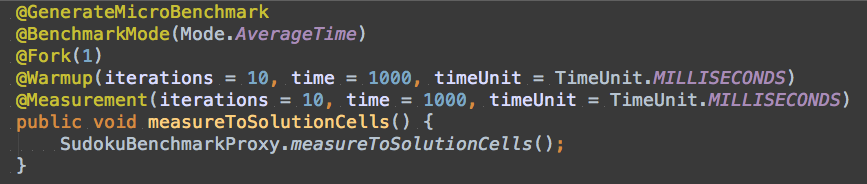
The only issue I had with JMH is that I couldn't get the Scala methods to be picked up by the @GenerateMicroBenchmark run. I did a little workaround by creating a Java class which then delegates to the scala implementations I wanted to test - this works well enough for me.

methods can be annotated which configure JMH
The above screenshot shows the general idea - The Java code above calls a Scala object which gathers all performance testing related code.  In the example above, the SudokuBenchmarkProxy object is also the right place to setup the environment for the performance test to run in.

Update: Those problems had to do with my project setup. I have a multimodule maven build and the benchmarks are located in a submodule. It seems that at the moment the wrapper code in target/generated-sources/jmh is not generated when run in multimodule scenario, but only when called directly where the pom with the jmh plugin is defined.

There is even a maven scala archetype for JMH available which provides the basic setup, which I used for the initial project setup. The scala archetype (0.5.6), invocated like this:


will produce a configuration like this:


This runs fine when it is used on it's own, but if you want to use it in a submodule, change it to this:


After this, JMH will create the wrapper code also for multimodule maven builds. At least it solved the issue for me.

Update 2: As it turns out, this issue is already been worked on, and was only recently discussed on the mailing list.

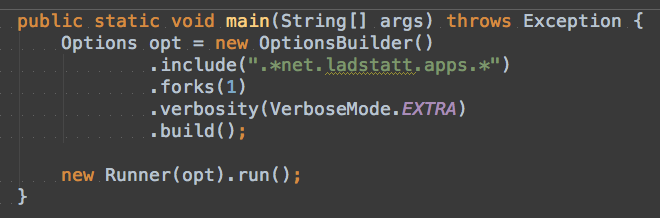
However,  the most pleasant mode to develop / debug / work on your performance bottlenecks with JMH is to use it's API. Like this you are able to directly call it, for example like this:


This executes JMH on your code, using the regex pattern to search for annotated methods. The run() method even returns the collected data, like such you could "easily" set up an automated performance regression testing system I suppose.

JMH by default gives you a jar file called "microbenchmarks.jar" which contains all dependencies (as defined by maven). Like this it is rather trivial to execute the tests on different machines.

Speaking of this one has to underline that performance testing is hard - the hardest part of it is to create comparable environments you run your tests run in. But this is trivial (?) compared with understanding the inner workings of the JVM - JMH hides much of this complexity and gives you here a head start!

Moreover, micro benchmarking is a science in itself. Make sure you are repairing the "right" part of your application. It only pays off if you hit the big points, and such points are more often than not buried in "management processes".

Micro benchmarking - a science in itself


Micro benchmarking maybe implies micro optimizations which often have the side effect of obfuscating your code base - and without a regression test harness built around those parts of your application it is likely that the next clean code developer just "repairs" the app back to the start. ;)

But if need be and you _have_ to squeeze everything out of your jvm(s), JMH will be a great addition to your toolset.

If you want to know more, ask this guy.


Wednesday, January 15, 2014

Home made JavaFX SceneBuilder

Ever wanted to have your own build of SceneBuilder? It's easy!


A month ago the source code of Scenebuilder was published. This was great news for the JavaFX community, since it is an example of a non trivial application written in JavaFX written by pros.

As far as I understand, you are even allowed to use the source of Scenebuilder (or parts of it) to build your own applications, since the code is released in a BSD style license. By the way, check out this site if you want to get an elevator pitch for various opensource licenses.

So what is necessary to have your own version of SceneBuilder?

Setting up Scenebuilder in Intellij


The source code for Scene builder can be found in the OpenJFX repository. If you have all tools, just clone the openjfx rt repository. If you are new to the game, you should follow the instructions given here.

After cloning the repository, you will find the source code for the Scene Builder in

rt/apps/scenebuilder

I gave it a try to just import this directory with IntelliJ 13 Community Edition (ignoring the build.xml file) and was able to set it up without build errors in no time! Very nice. The only thing I had to do manually was to set the project SDK to the latest JDK 8 preview and set the project language to 8.0 (with lambdas).


Then, in the project explorer, hit right mouse button and run the main method of the SceneBuilderApp - if you are lucky then you will be rewarded with the following screen:


I've changed the label.untitled in SceneBuilderApp.properties to 'My very own untitled Document' just to illustrate that it is not the default installation.

In addition, I would advise you to import JavaFX8 sources for Intellij like described here.

Project Layout


The project consists of two main parts, SceneBuilderApp and SceneBuilderKit.  The SceneBuilderApp contains the application logic and the SceneBuilderKit the infrastructure. The latter has far more classes, but they are also not application specific. I'm pretty sure that one could find one or the other gem in it. But as far as this post goes, I only describe some aspects of the SceneBuilderApp project.

FXML Handling in SceneBuilderApp


I was interested specifically in how SceneBuilder itself would manage the loading of FXML for its internal controllers.

The first thing which caught my attention was how the SceneBuilderApp project was structured. It seems like that every Controller, its fxml and css and other resources are grouped together in a package.

Controllers, FXML and resources grouped together
If you have a bunch of controllers, this will surely help to keep a clean structure. Using naming conventions clearly improves readability.

fxml and associated static images are placed in the same directory

The controllers extend an abstract controller, which provides utility methods for interacting with the stage. In essence, every controller has its reference to the stage baked in, which comes in handy for many things, for example when handling the setOnCloseRequest(...) on the stage.

Every Controller has its own FXMLLoader, which is fed with resources, the fxml and the controller class. What is interesting also is that right after the loading of the fxml took place and every widget is injected properly, it is checked if the expected widgets don't contain null references.

Like this you can shield yourself from accidental mismatch of FXML id's and fail fast - also a good habit, especially if the application code and the fxml code is maintained by more than one developer.

The FXML is loaded implicitly when you first access the controller - i.e. when you open up the window first time. In this context, checking out the AbstractWindowController and its derivatives is definitely some well spend time for an aspiring JavaFX developer. There are some gems in it like resizing the stage for various screens like seen in the method clampWindow - have a look :)


Example: PreferencesWindowController


Of course I won't discuss every class here, but I'll have a look at one example Controller, let's take the PreferencesWindowController. 

SceneBuilder's Preferences Dialog opened in SceneBuilder (v1.1)
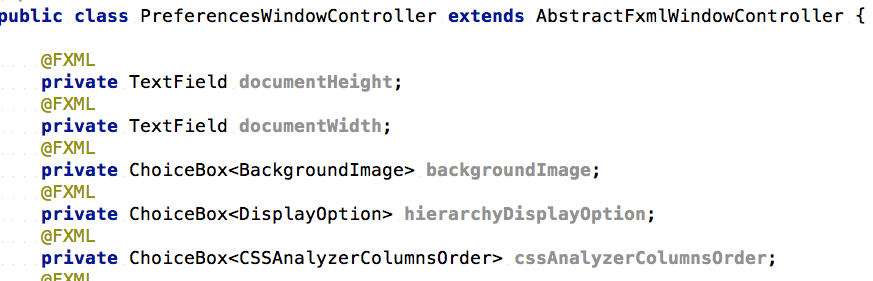
First thing you see are the member declarations which are annotated with the @FXML annotation. Those attributes are injected by the FXMLLoader when loading the fxml ... but when and how does this happen?

head of PreferencesWindowController source


Actually, this problem was tackled in a nice way; every controller which extends from AbstractWindowController has a method called openWindow. This then triggers a chain of calls which ultimately result in the loading of the FXML and hence in injecting the right objects to the attributes of the concrete Controller. The following illustration may help here:

how controllers get to their fxml (pic was made with skitch btw) 

As far as I can tell the FXML gets loaded only once, and the code which does the magic is shared with all controllers. :) After loading the controllerDidLoadFxml() method is called, which resides again in the PreferencesWindowController. The preferences themselves are managed in a singleton named PreferencesController, and the values are now filled up for to the UI. 

At this point in time the ChangeListeners are initialized. The BackgroundImageListener for example changes the default background when selecting the corresponding ChoiceBox. The Listeners are all defined as static inner classes, which keeps things private to the Controller. 

Btw, for the permanent storage of the values the Preferences class was chosen - a nice utility for storing user or app specific values in a portable way.

There are many more aspects to discover in the SceneBuilder source code, I merely scratched the surface.  For me the most important thing is how to structure an application, best practices etc. - here the SceneBuilder source code is a great inspiration. 

It is really trivial to get to your own installation of SceneBuilder, and the code is very readable and definitely worth a look!

Sunday, September 15, 2013

Nashorn Javascript Engine with JDK8 - Hello World

In the upcoming JDK8 release a new Javascript engine called Nashorn will be included. Together with a new command line program called "jjs" it is trivial to write applications in Javascript which in turn can utilize any JVM based library.


Lund Cathedral, Skåne, Sweden


A hello world application could look like this:

java.lang.System.out.println("hello world");

This line should be put into a file called 'hello.js' and then you can start the Nashorn engine by issuing following command:

$JAVA_HOME/bin/jjs hello.js


Embedding javascript code in Scala applications is also easy by using the JSR223.


For a more detailed discussion on this topic you can read the Java Scripting Programmer's Guide or skim through this slides by Attila Szegedi. Maybe you stop by the nice blog post from Felix Bembrick how to combine Nashorns superpowers with JavaFX canvas to get an idea what can be possible.

Of course, there are other approaches to combine Scala and Javascript, but this is another story ...


Thursday, April 4, 2013

OpenCV on MacOSX - with Java support

You surely know that OpenCV has now first class java support since version 2.4.4. What you may not know is that literally since yesterday it is quite easy to install it on MacOsX, given that you use MacPorts.


Factory Floor
Factory Floor

box:lad$ sudo port selfupdate
Password:
--->  Updating MacPorts base sources using rsync
MacPorts base version 2.1.3 installed,
MacPorts base version 2.1.3 downloaded.
--->  Updating the ports tree
--->  MacPorts base is already the latest version

The ports tree has been updated. To upgrade your installed ports, you should run
  port upgrade outdated
box:lad$ sudo port install opencv +java
--->  Computing dependencies for opencv
--->  Dependencies to be installed: apache-ant cmake pkgconfig
--->  Fetching archive for apache-ant
--->  Attempting to fetch apache-ant-1.9.0_0.darwin_12.noarch.tbz2 from http://lil.fr.packages.macports.org/apache-ant
--->  Attempting to fetch apache-ant-1.9.0_0.darwin_12.noarch.tbz2.rmd160 from http://lil.fr.packages.macports.org/apache-ant
--->  Installing apache-ant @1.9.0_0
--->  Activating apache-ant @1.9.0_0
--->  Cleaning apache-ant
--->  Fetching archive for cmake
--->  Attempting to fetch cmake-2.8.10_1.darwin_12.x86_64.tbz2 from http://lil.fr.packages.macports.org/cmake
--->  Attempting to fetch cmake-2.8.10_1.darwin_12.x86_64.tbz2.rmd160 from http://lil.fr.packages.macports.org/cmake
--->  Installing cmake @2.8.10_1
--->  Activating cmake @2.8.10_1
--->  Cleaning cmake
--->  Fetching archive for pkgconfig
--->  Attempting to fetch pkgconfig-0.27.1_2.darwin_12.x86_64.tbz2 from http://lil.fr.packages.macports.org/pkgconfig
--->  Attempting to fetch pkgconfig-0.27.1_2.darwin_12.x86_64.tbz2.rmd160 from http://lil.fr.packages.macports.org/pkgconfig
--->  Installing pkgconfig @0.27.1_2
--->  Activating pkgconfig @0.27.1_2
--->  Cleaning pkgconfig
--->  Fetching archive for opencv
--->  Attempting to fetch opencv-2.4.4_3+java.darwin_12.x86_64.tbz2 from http://lil.fr.packages.macports.org/opencv
--->  Attempting to fetch opencv-2.4.4_3+java.darwin_12.x86_64.tbz2 from http://mse.uk.packages.macports.org/sites/packages.macports.org/opencv
--->  Attempting to fetch opencv-2.4.4_3+java.darwin_12.x86_64.tbz2 from http://packages.macports.org/opencv
--->  Fetching distfiles for opencv
--->  Attempting to fetch OpenCV-2.4.4a.tar.bz2 from http://ignum.dl.sourceforge.net/project/opencvlibrary/opencv-unix/2.4.4
--->  Verifying checksum(s) for opencv
--->  Extracting opencv
--->  Applying patches to opencv
--->  Configuring opencv
--->  Building opencv
--->  Staging opencv into destroot
--->  Installing opencv @2.4.4_3+java
--->  Deactivating opencv @2.4.4_2
--->  Cleaning opencv
--->  Activating opencv @2.4.4_3+java
--->  Cleaning opencv
--->  Updating database of binaries: 100.0%
--->  Scanning binaries for linking errors: 100.0%
--->  No broken files found.
box:lad$ port contents opencv | grep java
  /opt/local/share/OpenCV/java/libopencv_java244.dylib
  /opt/local/share/OpenCV/java/opencv-244.jar
box:lad$ 

Some Scala code to use it:


Many thanks to Andrew Stromnov to make this possible, since compiling yourself OpenCV with Java Support is not something the average Java guy will do. (I did it. It was a pleasure. ;-) )


Update:


Keep in mind that the port command compiles the jar file with the currently available JDK. If you run the port command in verbose mode you'll see that the jar file is assembled using ant. In order to force the port command to use a certain JDK you can patch the ant script:

 80 # OS specific support.  $var _must_ be set to either true or false.
 81 cygwin=false;
 82 darwin=false;
 83 mingw=false;
 84 case "`uname`" in
 85   CYGWIN*) cygwin=true ;;
 86   Darwin*) darwin=true
 87            if [ -z "$JAVA_HOME" ] ; then
 88                if [ -x '/usr/libexec/java_home' ] ; then
 89                    JAVA_HOME=`/usr/libexec/java_home -v 1.7`
 90                elif [ -d "/System/Library/Frameworks/JavaVM.framework/Versions/CurrentJDK/Home" ]; then
 91                    JAVA_HOME=/System/Library/Frameworks/JavaVM.framework/Versions/CurrentJDK/Home
 92                fi
 93            fi
 94            ;;
 95   MINGW*) mingw=true ;;
 96 esac

Like this, the JDK 1.7 on my machine will be used for generating the jar file.